
The Unveiling of Google Whisk
Introduction
Creating AI art usually means typing text prompts—describe what you want, hope the AI understands, refine through trial and error. “A cat wearing a red hat in the style of Van Gogh” might produce something close, but rarely exactly what you envision. Google just flipped this process entirely.
Whisk, launched by Google Labs in December 2024, lets you generate images using images as prompts. Want to create something in a specific art style? Drop in an example image showing that style. Need a particular scene setting? Drag in a reference photo. Want a specific subject? Use an image of it. Whisk combines these visual inputs to create new images matching your references.
According to Google’s announcement blog, Whisk represents a shift from “prompt engineering” to “visual remixing”—showing the AI what you want instead of describing it. Early testing shows users create usable images 3-5x faster with Whisk compared to text-to-image tools, particularly for style-specific generations.
What is Whisk?
The Three-Input Concept
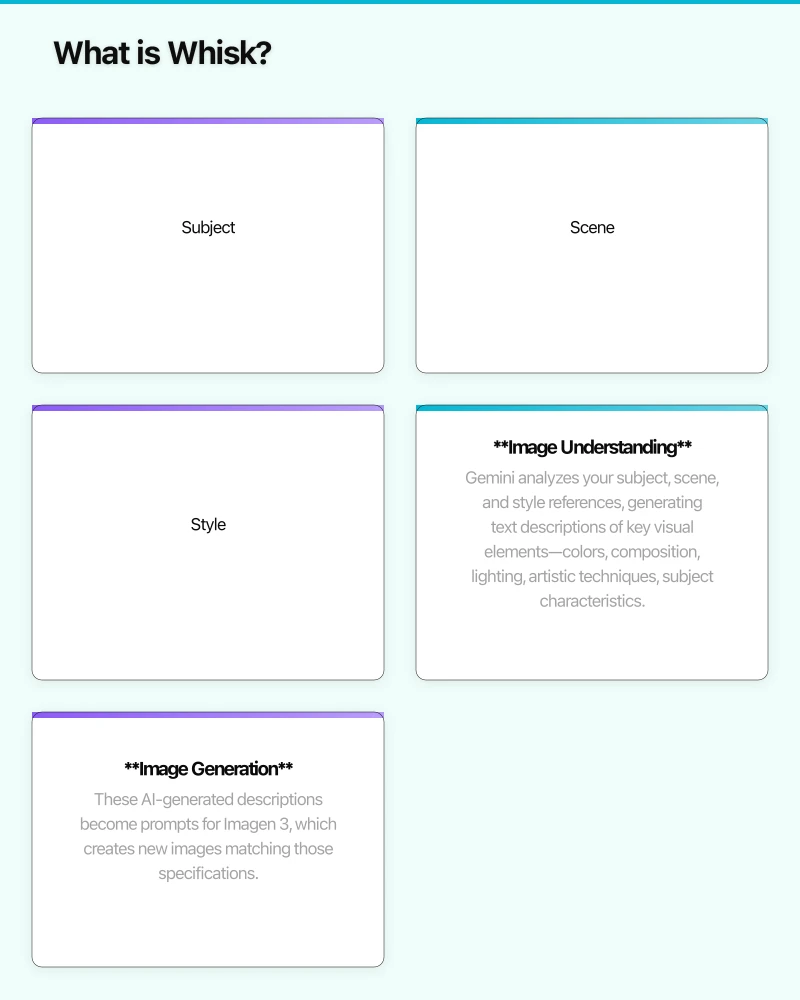
Whisk uses three separate image inputs to control generation:
Subject: What should be in the image? Upload a photo of a person, pet, object, or character. Whisk extracts the key visual features—what the subject looks like, poses, proportions—and uses those to guide generation.
Scene: Where should it be? Provide an image showing the environment—a beach sunset, a futuristic cityscape, a cozy living room. Whisk understands spatial layout, lighting conditions, and atmosphere from this reference.
Style: How should it look artistically? Supply an example showing the desired aesthetic—watercolor painting, pixel art, anime style, photorealistic render. Whisk applies this artistic treatment to the generated output.
How It Actually Works
Behind the scenes, Whisk uses Google’s Imagen 3 model, the same system powering other Google AI image generation. But instead of directly processing your reference images, Whisk first uses Gemini, Google’s multimodal AI, to analyze each reference and generate detailed text descriptions.
According to Google’s technical explanation, this two-step process works like this:
-
Image Understanding: Gemini analyzes your subject, scene, and style references, generating text descriptions of key visual elements—colors, composition, lighting, artistic techniques, subject characteristics.
-
Image Generation: These AI-generated descriptions become prompts for Imagen 3, which creates new images matching those specifications.
This approach combines strengths of both systems: Gemini’s sophisticated visual understanding with Imagen’s high-quality generation. You can also edit the AI-generated descriptions before final generation, giving you text-based fine-tuning if needed.
Key Features and Interface
Visual-First Workflow
The interface emphasizes speed over precision. According to early user reviews on Reddit’s r/StableDiffusion, Whisk generates results in 15-30 seconds—faster than most text-to-image tools requiring multiple refinement iterations.
You drag reference images into three slots (subject, scene, style), click generate, and see results immediately. No prompt engineering skills required. No understanding of AI terminology needed. If you can drag files, you can use Whisk.
Built-In Remixing
Once you generate an image, Whisk lets you immediately remix it—swap the style reference, change the scene, try different subjects. Each variation generates in seconds, enabling rapid creative exploration.
Google’s demo videos show designers creating 20+ variations in minutes, testing different style combinations to find the perfect aesthetic for a project.
Downloadable Results
Generated images download at 1024x1024 resolution—sufficient for social media, presentations, and concept development. While not high enough for large-format printing, it matches the resolution of most AI image generators like Midjourney and DALL-E.
Use Cases Emerging from Early Testing
Social Media Content Creation
TechCrunch’s hands-on review found Whisk particularly effective for creating branded social content. Upload your product as subject, your desired background as scene, and trending visual style as reference—generate on-brand imagery in seconds.
Marketers using Whisk report creating 10-15 social graphics in the time previously needed for 2-3 using traditional design tools or text-based AI generators.
Design Inspiration and Moodboards
Designers use Whisk for rapid concept exploration. According to Creative Bloq’s analysis, combining existing design references with new subjects lets designers quickly visualize “what if” scenarios—what if this character appeared in that environment with this artistic treatment?
Traditional moodboarding involves finding reference images that approximate your vision. Whisk lets you synthesize references into custom visuals directly.
Educational and Personal Projects
Teachers use Whisk to quickly create visual teaching materials. History teachers generate period-accurate scene recreations by combining historical photo references with artistic styles matching the era.
Students use it for presentations, avoiding generic stock photos by creating custom imagery matching their specific topics.
Character and Concept Design
Game developers and writers use Whisk for rapid character visualization. Describe your character in text to DALL-E, and you’ll iterate through dozens of generations trying to get details right. With Whisk, you combine reference images showing the exact facial features, clothing style, and artistic treatment you want.
Technology Foundations
Gemini’s Visual Understanding
Whisk’s effectiveness depends on Gemini’s multimodal capabilities. Google’s latest model analyzes images understanding not just objects but artistic techniques, lighting conditions, composition principles, and stylistic elements.
According to Google’s research blog, Gemini processes images at a level that can distinguish between “watercolor painting” and “gouache painting” or recognize specific artistic movements like “Art Nouveau” versus “Art Deco” from visual examples alone.
Imagen 3’s Generation Quality
Imagen 3, Google’s third-generation image model, powers the actual image creation. According to Google’s benchmarks, Imagen 3 generates photorealistic images comparable to Midjourney v6 and DALL-E 3 in quality while excelling at text rendering within images and following complex multi-element prompts.
The system combines diffusion models for image generation with transformer-based text encoding, similar to other state-of-the-art generators but trained on Google’s massive image datasets.
Comparison to Existing Tools
Versus Text-to-Image Generators (DALL-E, Midjourney)
Advantages: Faster for style-specific work, no prompt engineering skills needed, more precise style matching when you have reference examples.
Disadvantages: Less precise control over specific details, limited to visual references you can find or create, experimental availability means inconsistent access.
The Verge’s comparison testing found Whisk generated usable images in 2-3 attempts versus 8-12 attempts with Midjourney for style-matching tasks, but Midjourney produced higher-quality results when given time for refinement.
Versus Style Transfer Tools
Traditional style transfer (like Prisma or DeepArt) applies artistic filters to existing images. Whisk generates entirely new images—different subjects, different compositions—that match reference styles.
Versus Traditional Photo Editing
Photoshop and similar tools require manual skill for composite creation. Whisk automates composition while maintaining visual coherence—lighting, perspective, and style match automatically rather than requiring manual adjustment.
Current Limitations
Experimental Status
Whisk is a Google Labs experiment, not a full product. According to Google’s FAQ, availability fluctuates based on server capacity. The service may become unavailable during high-demand periods.
Compositional Unpredictability
Because Whisk interprets your references through Gemini’s understanding then generates through Imagen, results don’t always match expectations. Complex subjects or unusual style combinations sometimes produce unexpected outputs.
User feedback on ProductHunt notes success rates around 60-70%—most generations are usable but require 2-3 attempts to get ideal results.
Limited Control Granularity
You can’t specify “make the subject 30% larger” or “shift the scene lighting 15 degrees left.” Control is coarse—you work with entire reference images, not fine-tuned parameters. This speeds up creation but limits precision.
Resolution Constraints
1024x1024 output resolution works for digital use but not large prints or detailed professional work. This matches most consumer AI image generators but falls short of tools like Midjourney’s upscaling capabilities.
Future Potential and Direction
Google hasn’t announced specific roadmap details, but early user feedback suggests logical expansion directions:
Higher resolution outputs: Moving to 2048x2048 or 4096x4096 would enable professional creative use.
More reference inputs: Adding texture references, color palette references, or composition references would provide finer creative control.
Integration with Google Workspace: Seamless access from Slides, Docs, or Sites would make Whisk a practical business tool.
Commercial licensing clarity: Currently unclear whether generated images can be used commercially, limiting professional adoption.
Mobile app: The visual-first interface would work excellently on tablets and phones, expanding accessibility.
Conclusion
Google Whisk represents a genuine interface innovation in AI image generation. While text-to-image tools require users to learn prompt engineering—essentially a new language for communicating with AI—Whisk lets you show instead of tell.
This matters because most people think visually. Designers, marketers, educators, and creatives work with visual references constantly. Whisk meets them where they already work rather than requiring they learn new skills to access AI capabilities.
The technology isn’t perfect—experimental availability, occasional unpredictable outputs, limited resolution—but the core concept proves sound. Early adopters report creating usable creative assets 3-5x faster than with text-based tools.
As Google refines Whisk and potentially integrates it into production products, visual-first AI generation may become the standard approach, relegating text prompts to fine-tuning rather than primary creative control.
The unveiling of Whisk suggests a future where creating with AI feels less like programming and more like collaging—assembling visual references to express creative intent naturally.
Sources
- Google Labs - Whisk Official Page - 2024
- Google Blog - Whisk Announcement - December 2024
- DeepMind - Imagen 3 Technology - 2024
- DeepMind - Gemini Multimodal AI - 2024
- TechCrunch - Google Whisk Hands-On - December 2024
- The Verge - Whisk vs Midjourney Comparison - December 2024
- Creative Bloq - Google Whisk Review - December 2024
Explore more Google AI innovations.
Explore more Google AI innovations.
For practical web design and SEO guidance, my team at Cosmos Web Tech helps Australian businesses build high-performing websites.
Ash Ganda is the founder of Ganda Tech Services, a Sydney-based technology consultancy delivering cloud, web, and mobile solutions for Australian businesses.
About the Author
Ashish Ganda is the founder of Ganda Tech Services, a Sydney-based technology consultancy specialising in cloud infrastructure, web development, and mobile app solutions for Australian businesses.
AI Strategy Primer for Australian Business Leaders
A practical framework for AI adoption in 2026 — cut through the hype and start with what matters.