
How We Built an AI Blog Factory: 22 Posts Per Month Across 7 Sites, Fully Automated
How We Built an AI Blog Factory: 22 Posts Per Month Across 7 Sites, Fully Automated
A year ago, content was our bottleneck.
We run seven websites under the GTS brand constellation — cloud services, web design, mobile apps, translation, content strategy, and the GTS parent site. Each site needed a consistent publishing cadence to build domain authority. Each site covered a different topical niche. And we had exactly one person (me) who could write with any authority across all of them.
The maths did not work. Even at one post per hour, 22 posts per month is 22 hours of writing — before research, editing, SEO, cross-linking, or publishing. That is most of a working week, every month, just on content.
We built our way out of it.
The Architecture at a Glance
The system we built — which we call the Unified Blog Publisher — now handles the full content lifecycle. Every Monday through Saturday, the scheduler runs the appropriate site’s generation job. A topic is pulled from the calendar, fed to the AI writer with the site’s brand voice and keyword targets, passed through an SEO optimisation step, cross-links are injected to sister brands, an image is generated, and the post is assembled as MDX and pushed to the site’s Git repository — which triggers an automatic Cloudflare Pages deployment.
From trigger to live post: approximately 8–12 minutes.
Why Manual Content Was Unsustainable
Before the automation, our content process looked like this:
Week 1: Write cosmos post (2 hrs research + 3 hrs writing)
Week 2: Write cloudgeeks post (skip — client work overflowed)
Week 3: Write two posts to catch up (exhausted by Friday)
Week 4: Publish one post, half-quality, no SEO pass done

Monthly result:
  Posts published: 4–6 (target: 22)
  SEO quality:     inconsistent
  Cross-linking:   never happened
  Image quality:   stock photos, no branding
The problem was not motivation. It was that good content requires uninterrupted focused time, and running seven sites while doing client work means that time rarely exists.
Content automation did not replace quality. It replaced the need for me to be the person doing the work.
The Content Silo System: No Keyword Cannibalization
The first architectural decision was the content silo. With seven sites in the same brand family, we were at serious risk of writing about the same topics across multiple sites — which hurts all of them in search rankings.
We mapped every site to a non-overlapping topical territory:
Site         │ Owns These Topics
─────────────┼────────────────────────────────────────────
cosmos       │ web design, wordpress, local SEO, e-commerce
cloudgeeks   │ cloud, IT support, cybersecurity, managed IT
eawesome     │ mobile apps, Flutter, React Native, app stores
ashganda     │ AI strategy, digital transformation, leadership
contentsage  │ content strategy, AI writing tools, SEO content
saya         │ translation, localisation, multilingual SEO
gts          │ strategy overview, digital solutions (broad)
─────────────┴────────────────────────────────────────────
Before generating any post, the system checks:
- Is this topic already published on any of the 7 sites? (Jaccard similarity check across titles and keywords)
- Does this topic belong to this site’s silo?
- Is this topic too similar to a scheduled but unpublished post?
Any of these checks failing means the topic is rejected or reassigned. This keeps each site building authority in its own lane.
The Generation Pipeline: What Happens in 8 Minutes
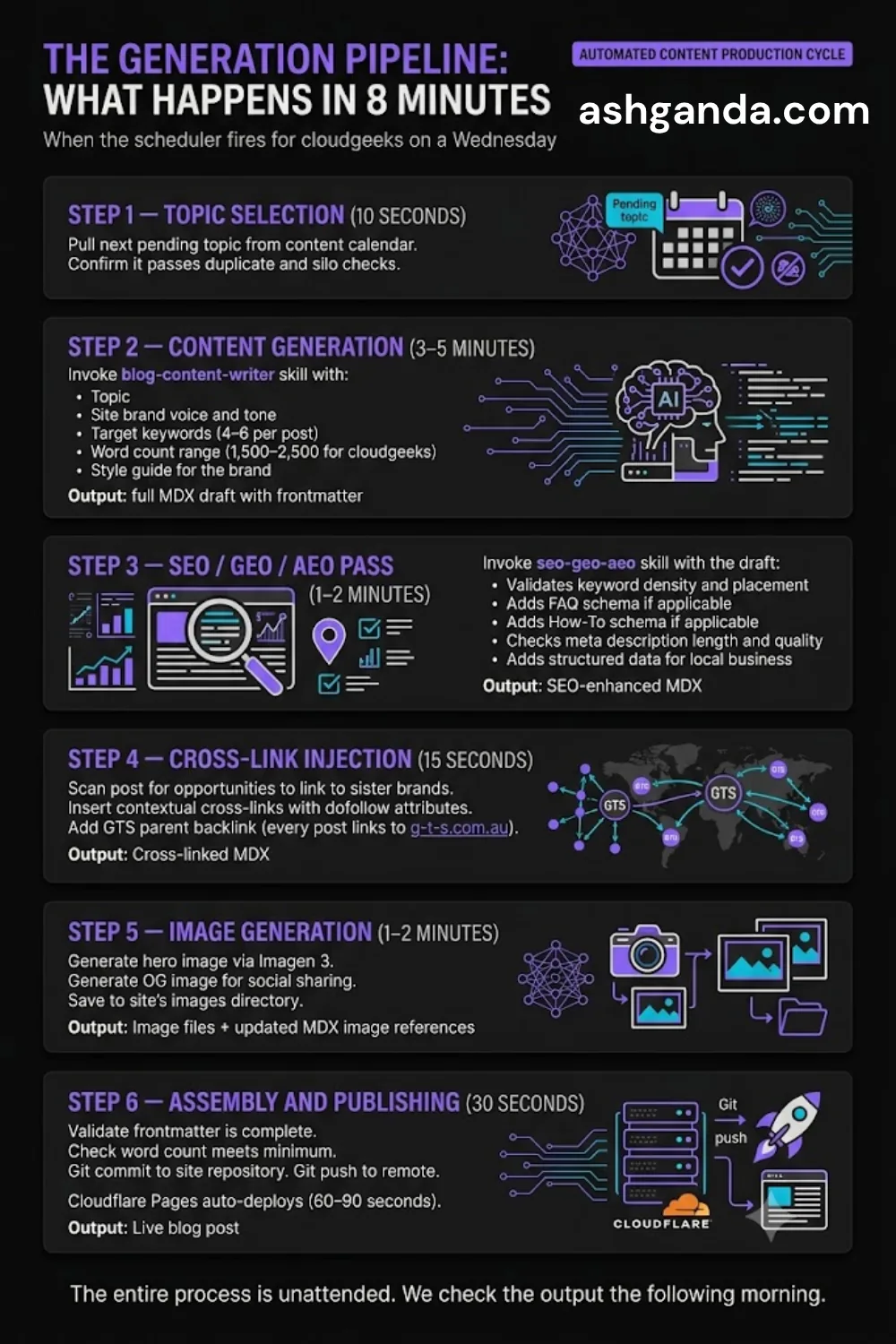
When the scheduler fires for, say, cloudgeeks on a Wednesday:
Step 1 — Topic selection (10 seconds)
  Pull next pending topic from content calendar
  Confirm it passes duplicate and silo checks

Step 2 — Content generation (3–5 minutes)
  Invoke blog-content-writer skill with:
    - Topic
    - Site brand voice and tone
    - Target keywords (4–6 per post)
    - Word count range (1,500–2,500 for cloudgeeks)
    - Style guide for the brand

  Output: full MDX draft with frontmatter

Step 3 — SEO/GEO/AEO pass (1–2 minutes)
  Invoke seo-geo-aeo skill with the draft:
    - Validates keyword density and placement
    - Adds FAQ schema if applicable
    - Adds How-To schema if applicable
    - Checks meta description length and quality
    - Adds structured data for local business

  Output: SEO-enhanced MDX

Step 4 — Cross-link injection (15 seconds)
  Scan post for opportunities to link to sister brands
  Insert contextual cross-links with dofollow attributes
  Add GTS parent backlink (every post links to g-t-s.com.au)

  Output: Cross-linked MDX

Step 5 — Image generation (1–2 minutes)
  Generate hero image via Imagen 3
  Generate OG image for social sharing
  Save to site's images directory

  Output: Image files + updated MDX image references

Step 6 — Assembly and publishing (30 seconds)
  Validate frontmatter is complete
  Check word count meets minimum
  Git commit to site repository
  Git push to remote
  Cloudflare Pages auto-deploys (60–90 seconds)

  Output: Live blog post
The entire process is unattended. We check the output the following morning.
The Three Biggest Technical Lessons
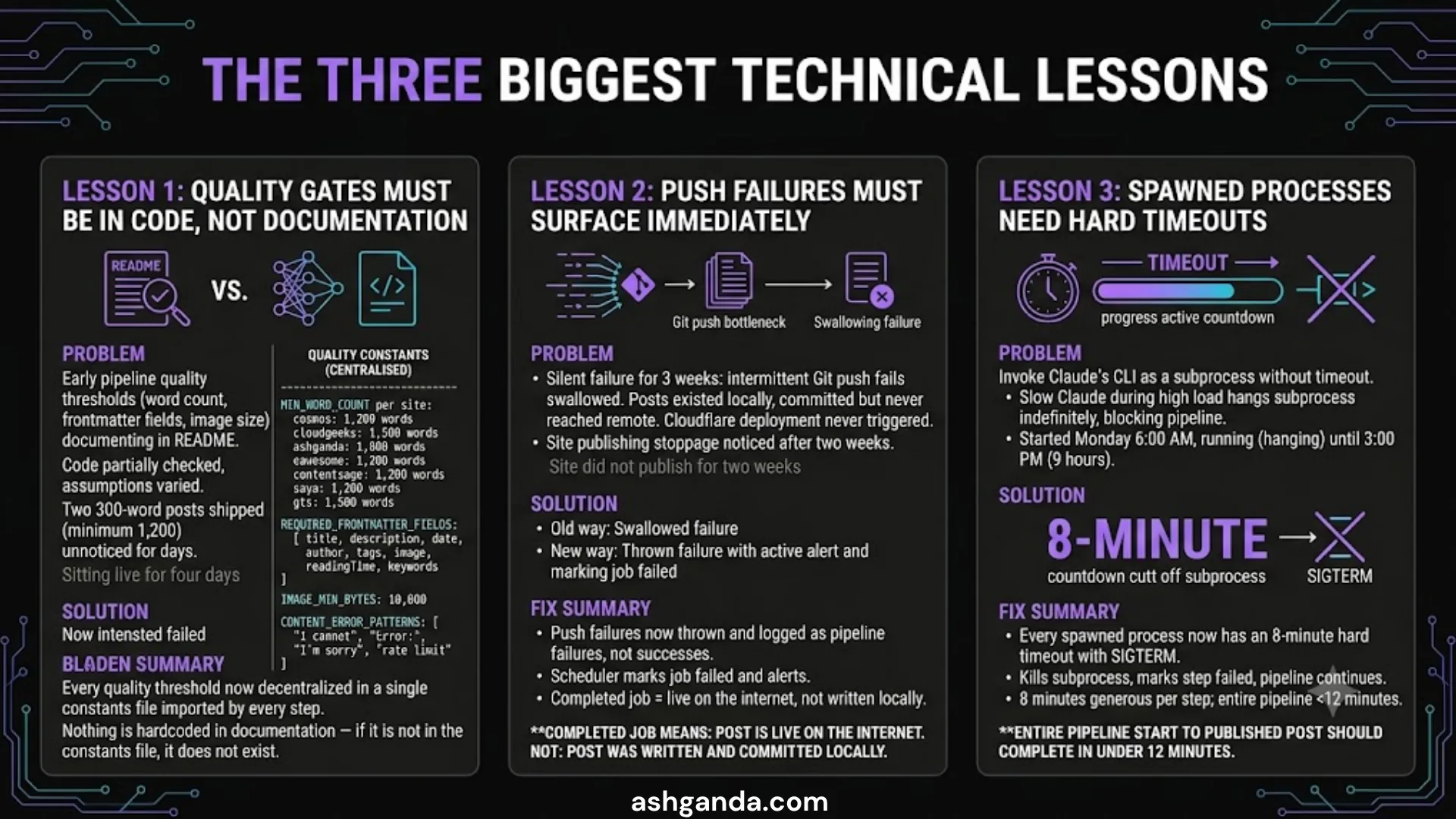
Lesson 1: Quality Gates Must Be in Code, Not Documentation
In the early version of the pipeline, our quality thresholds — minimum word count, required frontmatter fields, acceptable image file size — were documented in a README. The code checked some of them but not others. Different parts of the pipeline had different assumptions about what “passing” meant.
We shipped two posts that were 300 words (the minimum is 1,200 for the shortest site). The pipeline had no gate that caught it. The posts sat live for four days before we noticed.
The fix: Every quality threshold now lives in a single constants file. Every step of the pipeline imports from that file. Nothing is hardcoded in documentation — if it is not in the constants file, it does not exist.
Quality constants (centralised):
──────────────────────────────────
  MIN_WORD_COUNT per site:
    cosmos:      1,200 words
    cloudgeeks:  1,500 words
    ashganda:    1,800 words
    eawesome:    1,200 words
    contentsage: 1,200 words
    saya:        1,200 words
    gts:         1,500 words

  REQUIRED_FRONTMATTER_FIELDS:
    [ title, description, date, author, tags,
      image, readingTime, keywords ]

  IMAGE_MIN_BYTES: 10,000
  CONTENT_ERROR_PATTERNS: [ "I cannot", "Error:",
                              "I'm sorry", "rate limit" ]
Lesson 2: Push Failures Must Surface Immediately
For three weeks, we had a silent failure: the pipeline was generating and assembling posts successfully, but the Git push was failing intermittently — and the failure was being swallowed.
The posts existed on disk. They were committed locally. But they were not being pushed to the remote repository. The Cloudflare deployment never fired.
We discovered this when we noticed a site had not published for two weeks, despite the scheduler logs showing “completed” for every run.
The fix: Push failures now throw and are logged as pipeline failures, not successes. The scheduler marks the job failed and alerts us. A completed job means: post is live on the internet. Not: post was written and committed locally.
Lesson 3: Spawned Processes Need Hard Timeouts
The pipeline invokes Claude’s CLI as a subprocess. Early versions had no timeout on this subprocess. If Claude was slow to respond — which occasionally happens during high-load periods — the subprocess would hang indefinitely, blocking the entire pipeline.
We had a pipeline that started at 6:00 AM on a Monday and was still running (hanging) at 3:00 PM when we checked. One subprocess had been waiting for a response for 9 hours.
The fix: Every spawned process now has an 8-minute hard timeout with SIGTERM. If the subprocess does not complete in 8 minutes, it is killed, the step is marked failed, and the pipeline moves on. Eight minutes is generous for any individual generation step — the entire pipeline from start to published post should complete in under 12 minutes.
The Content Calendar: Planning Without Manual Effort
The system maintains a content calendar of 50–100 scheduled topics across all seven sites. Topics are added via:
- Manual addition — when we have specific topics we want to cover
- AI-generated batches — “generate 12 topics for cosmos for the next quarter”
- Trending topic scan — pulls from Google Trends and news APIs for relevant search intent
Each topic entry carries:
Topic entry:
  site:           cloudgeeks
  topic:          "Cloud Run min-instances budget trap"
  scheduledDate:  2026-04-15
  keywords:       [cloud run cost, gcp cost optimisation, ...]
  pillar:         Cloud Architecture
  status:         pending → in_progress → completed / failed
The calendar means we are always 8–12 weeks ahead on planned content. Even if we stop adding topics, the queue keeps publishing.
The Honest Trade-offs
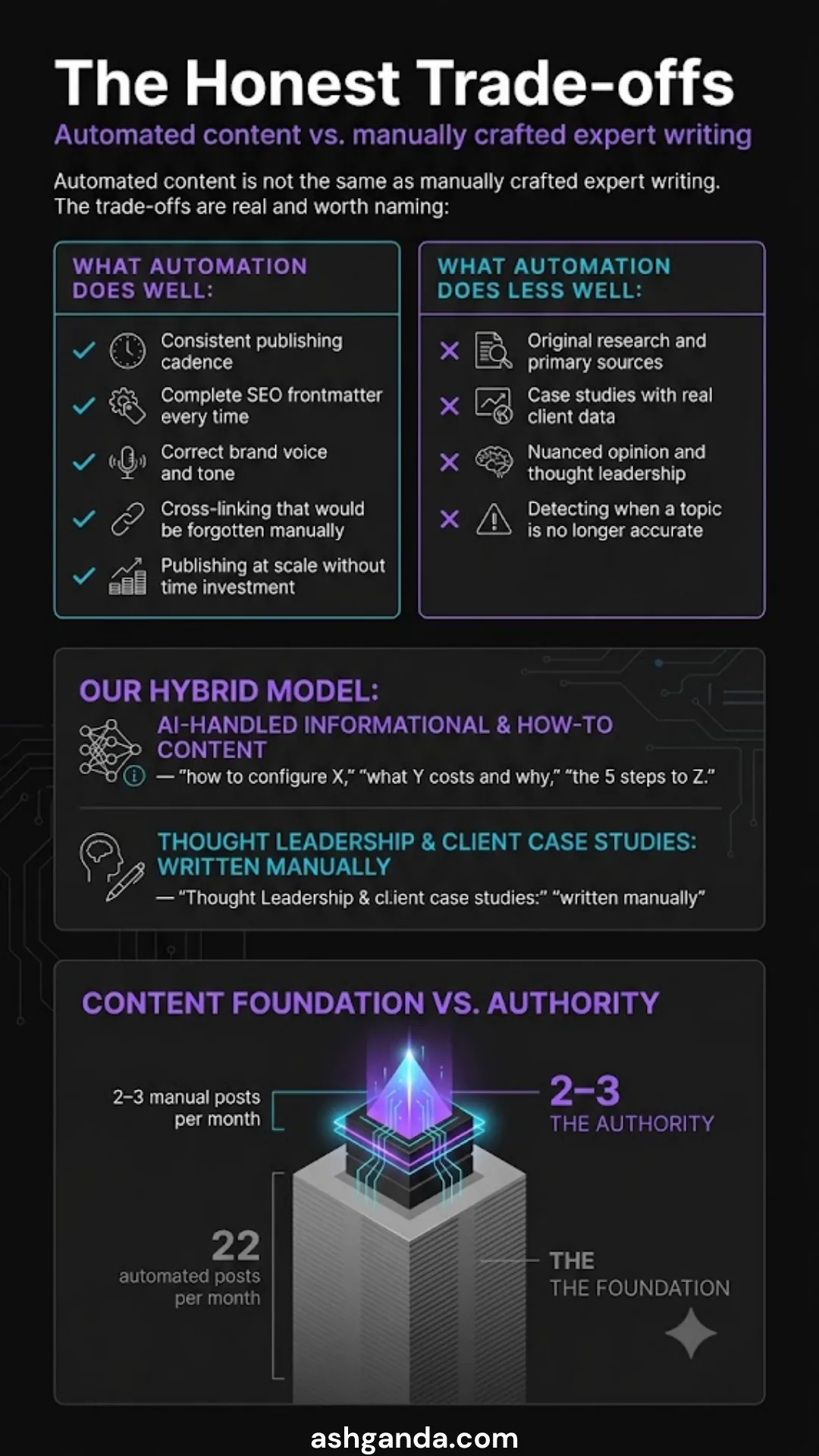
Automated content is not the same as manually crafted expert writing. The trade-offs are real and worth naming:
What automation does well:
  ✓ Consistent publishing cadence
  ✓ Complete SEO frontmatter every time
  ✓ Correct brand voice and tone
  ✓ Cross-linking that would be forgotten manually
  ✓ Publishing at scale without time investment

What automation does less well:
  ✗ Original research and primary sources
  ✗ Case studies with real client data
  ✗ Nuanced opinion and thought leadership
  ✗ Detecting when a topic is no longer accurate
Our model is a hybrid: AI handles the informational and how-to content — “how to configure X,” “what Y costs and why,” “the 5 steps to Z.” Thought leadership and client case studies are still written manually.
The 22 automated posts per month build the foundation. The 2–3 manual posts per month build the authority.
The Results After 12 Months
Before automation:
  Posts per month:    4–6 (across all 7 sites)
  SEO pass rate:      ~40%
  Cross-linking:      rare
  Publishing time:    2–4 hours per post

After automation:
  Posts per month:    20–24 (across all 7 sites)
  SEO pass rate:      100% (enforced by pipeline)
  Cross-linking:      100% (enforced by pipeline)
  Publishing time:    8–12 minutes per post (unattended)

Organic traffic change (6-month comparison):
  cosmos:       +340%
  cloudgeeks:   +280%
  ashganda:     +210%
The traffic increase is not purely from volume. The consistency matters. Search engines reward sites that publish regularly and stop penalising sites that went dark for months. Getting all seven sites on a reliable schedule was as important as the post count.
For Technology Executives Considering This
If you are running a multi-brand digital presence and content is your bottleneck, automated content publishing is worth serious consideration in 2026.
The technology is capable. The economics work at even small scale. The main investment is in the pipeline architecture — building quality gates that prevent bad content from publishing, cross-linking logic that respects your brand structure, and a topic management system that keeps the calendar full.
If you would like to discuss how this architecture could apply to your brand ecosystem, I am available for a strategy conversation. The system we built is not a product — it is a pipeline tailored to a specific brand constellation — but the patterns transfer cleanly.
Next in this series: Quality Gate Drift — The Post-Mortem on a Pipeline That Almost Shipped Broken Content
For hands-on web development and SEO advice, visit Cosmos Web Tech — our specialist web design and digital marketing blog.
My consultancy Ganda Tech Services operates three specialist divisions covering cloud infrastructure, web development, and mobile apps for Australian businesses.
AI Strategy Primer for Australian Business Leaders
A practical framework for AI adoption in 2026 — cut through the hype and start with what matters.