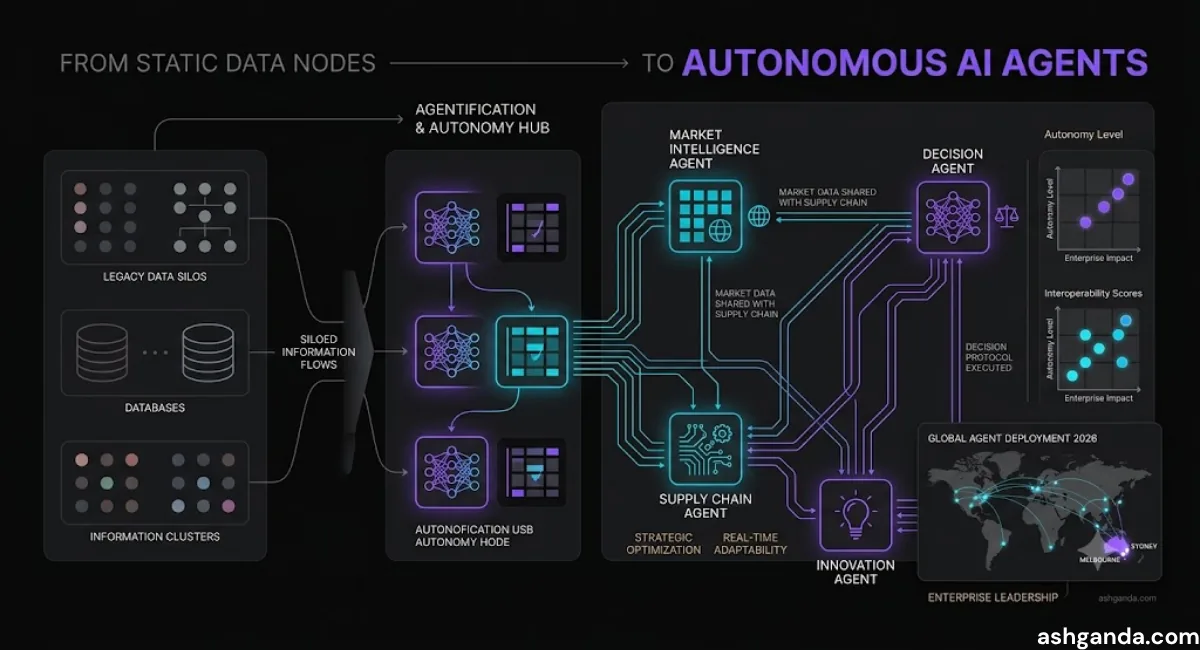
The Agent Economy: Why Enterprises Are Shifting from LLMs to Autonomous Agents
The enterprise AI landscape just shifted. In January 2026, Salesforce launched AgentForce (January 15), Microsoft released Copilot Studio Agents (January 22), and ServiceNow announced Agent Studio. What these platforms represent isn’t just another feature release—it’s a fundamental architectural shift from conversational AI to autonomous execution.
CTOs allocating 2026 AI budgets face a critical decision: continue investing in LLM-powered chatbots and copilots, or pivot toward agent-based architectures that can plan, execute, and self-correct across enterprise workflows. Early adopters are already reporting a 10x ROI improvement over traditional LLM implementations, with deployment timelines shortened from months to weeks.
The difference isn’t incremental—it’s categorical. LLMs respond to prompts. Agents pursue goals. And that distinction changes everything about how enterprises should architect AI systems.
Why LLMs Alone Can’t Deliver Enterprise Transformation
For the past two years, enterprises have been deploying LLMs (Large Language Models) for document summarization, email drafting, and code assistance. These implementations deliver value, but they hit a ceiling: LLMs are fundamentally reactive systems. They respond brilliantly to human prompts but lack the architectural components needed for autonomous work.
The Conversation-to-Action Gap
Consider a typical enterprise workflow: a customer requests a refund for a damaged product. Here’s what an LLM-powered system can do:
- Understand the request (natural language comprehension)
- Draft a response (text generation)
- Suggest next steps (recommendation)
Here’s what it cannot do without human intervention:
- Check inventory systems to verify the product and order
- Validate the customer’s purchase history and eligibility
- Initiate the refund in the payment system
- Update the CRM with interaction notes
- Trigger a replacement order if appropriate
- Follow up if the refund doesn’t process within 48 hours
That gap—between understanding what to do and actually doing it—is where billions of dollars in enterprise efficiency remain locked. LLMs can tell you how to complete these steps. Agents can execute them.
The Limitations Enterprise CTOs Are Hitting
1. No Memory Beyond Context Windows
LLMs process each interaction independently (or with limited conversation history within their context window). They don’t build persistent knowledge about your customers, your business rules, or past decisions. Every interaction starts fresh.
For enterprises, this means:
- Customer service agents re-ask qualifying questions
- Sales copilots don’t remember deal status from last week
- Code assistants forget your architecture decisions
2. No Tool Integration Without Custom Code
LLMs generate text. To interact with enterprise systems—CRMs, ERPs, databases, APIs—you need to build custom middleware that:
- Parses LLM outputs
- Maps them to API calls
- Handles authentication and error states
- Maintains transaction integrity
- Logs actions for compliance
Every integration becomes a custom development project, multiplying TCO and extending deployment timelines.
3. No Planning or Multi-Step Reasoning
LLMs are trained to predict the next token, not to plan sequences of actions toward a goal. When you ask an LLM “How should I handle this complex procurement request?”, it generates a description of steps. It doesn’t:
- Decompose the goal into executable sub-tasks
- Determine dependencies between steps
- Execute steps in optimal order
- Adjust the plan when steps fail
4. No Self-Correction
When an LLM makes an error, it continues confidently. It doesn’t:
- Verify its outputs against reality
- Detect when an API call failed
- Retry with different parameters
- Escalate to humans when stuck
These aren’t minor limitations—they’re fundamental architectural gaps that prevent LLMs from operating autonomously in enterprise environments.
Agent Architecture: The Four Components That Enable Autonomy
Autonomous agents aren’t just LLMs with extra features—they’re a distinct architectural pattern that combines four critical components.
1. Planning Engine
The planning engine decomposes high-level goals into executable action sequences.
How it works:
User Goal: "Process this month's vendor invoices"

Agent Planning:
├─ Step 1: Query ERP for unpaid invoices (due date < 30 days)
├─ Step 2: For each invoice:
│  ├─ Verify purchase order exists
│  ├─ Check three-way match (PO, receipt, invoice)
│  ├─ Flag discrepancies for human review
│  └─ If match: Approve for payment
├─ Step 3: Generate payment batch file
└─ Step 4: Submit to AP workflow for final authorization
The agent doesn’t just describe these steps—it plans them with:
- Dependency awareness: Step 3 can’t run until Step 2 completes for all invoices
- Conditional logic: Different paths for matched vs. mismatched invoices
- Resource optimization: Parallel processing where possible
Enterprise platforms implementing this:
- Salesforce AgentForce: Uses “Plan → Act → Observe” loop with Einstein Trust Layer
- Microsoft Copilot Studio Agents: Leverages Power Automate for workflow orchestration
- LangGraph (open-source): Graph-based planning with conditional edges
2. Tool Ecosystem
Agents need secure, governed access to enterprise systems. The tool ecosystem provides:
Pre-Built Connectors:
- Salesforce: 150+ native connectors (CRM, ERP, data warehouses)
- Microsoft: 1,000+ Power Platform connectors
- ServiceNow: Integration Hub with enterprise system adapters
Custom Tool Definition:
# Example: Custom procurement tool
@tool
def check_vendor_compliance(vendor_id: str) -> dict:
    """
    Check if vendor meets compliance requirements.

    Returns: {
        "compliant": bool,
        "last_audit_date": str,
        "risk_score": int,
        "required_documents": list
    }
    """
    # Connect to compliance system
    result = compliance_api.check_vendor(vendor_id)
    return result
The agent can call this tool when it determines vendor compliance checks are needed—without human intervention to parse outputs or map to system APIs.
Enterprise Implications:
- Faster deployment: Pre-built connectors eliminate months of integration work
- Governance: Centralized tool registry with access controls
- Auditability: All tool calls logged for compliance
3. Memory Systems
Agents maintain three types of memory:
Short-Term (Conversation) Memory:
- Current interaction context
- Immediate goal and sub-tasks
- Recent tool call results
Long-Term (Episodic) Memory:
- Past interactions with this customer/user
- Historical outcomes of similar tasks
- Learned preferences and patterns
Semantic (Knowledge) Memory:
- Company policies and procedures
- Product catalog and specifications
- Regulatory compliance requirements
Example: Customer Service Agent
Current Request: "My order hasn't arrived"

Short-term: Order #12345, shipped 5 days ago, tracking shows delivered

Long-term: Customer Jane Smith previously had 2 shipping issues,
           marked as VIP customer, prefers email communication

Semantic: Shipping policy allows refund after 7 days if not delivered,
          replacement authorized immediately for VIP customers

Agent Decision: Offer immediate replacement + expedited shipping
                (balancing policy, customer history, VIP status)
This context awareness transforms agents from reactive responders to proactive problem-solvers who understand business relationships over time.
4. Self-Correction Loop
Agents observe the results of their actions and adjust their approach when needed.
The ReAct Pattern (Reasoning + Acting):
1. Reason: Determine next action based on current state
2. Act: Execute the action via tool call
3. Observe: Check if action succeeded
4. Repeat: Adjust plan if needed, continue until goal achieved
Real-World Example:
Goal: Schedule meeting with external vendor

Action 1: Check calendar for availability
Observation: No conflicts next week
Action 2: Send calendar invite to [email protected]
Observation: Email bounced (invalid address)
Reasoning: Need alternate contact method
Action 3: Check CRM for vendor contact information
Observation: Found alternate email: [email protected]
Action 4: Send calendar invite to [email protected]
Observation: Invite accepted
Result: Meeting scheduled successfully
An LLM would have failed at Action 2 and stopped. An agent detects the failure, reasons about alternatives, and continues until it achieves the goal or determines human escalation is needed.
Enterprise Use Cases: Where Agents Deliver 10x ROI
The question isn’t whether agents are technically impressive—it’s whether they deliver measurable business value. Here are three use cases where early adopters are seeing 10x ROI compared to traditional LLM implementations.
1. Autonomous Procurement Agents
The Problem: Enterprise procurement involves 20-40 person-hours per purchase order, with 30% of orders requiring multiple approval cycles due to incomplete information or policy violations.
Agent Implementation:
A procurement agent handles:
- Intake: Receives purchase request via email, Slack, or form
- Vendor verification: Checks approved vendor list, compliance status, contract terms
- Budget validation: Confirms budget availability, checks against spending limits
- Policy compliance: Validates request against procurement policies (e.g., three-quote requirement for >$10K)
- Approval routing: Determines required approvers based on amount and category
- PO creation: Generates purchase order in ERP system
- Vendor communication: Sends PO to vendor, tracks acknowledgment
- Follow-up: Monitors delivery status, alerts stakeholders on delays
Results (Fortune 500 manufacturing company, 6-month pilot):
- 78% of purchase orders processed autonomously (no human intervention)
- Average processing time: Reduced from 4.2 days to 6 hours
- Cost per PO: $127 → $12 (10.5x improvement)
- Policy violation rate: 8.3% → 0.4%
- Employee satisfaction: +31 points (NPS) due to faster approvals
Why agents succeed where LLMs fail: The procurement workflow requires 15-20 system integrations (ERP, contract management, vendor databases, approval workflows, email) plus multi-step decision logic. LLMs can assist with individual steps; agents orchestrate the entire process.
2. Customer Service Agents with Memory
The Problem: Customer service teams spend 40% of interaction time re-establishing context—asking customers to repeat information, searching for past interactions, and verifying account details.
Agent Implementation:
A customer service agent maintains:
- Complete interaction history: Past tickets, resolutions, escalations
- Relationship context: Customer lifetime value, churn risk, product ownership
- Sentiment tracking: Frustration indicators, satisfaction trends
- Proactive monitoring: Detects at-risk customers before they contact support
Agent Capabilities:
Customer: "I'm still having the same problem"

Agent Memory:
- Ticket #T-98234 (2 weeks ago): Login issues, resolved by password reset
- Ticket #T-98456 (5 days ago): Same issue recurred, escalated to engineering
- Engineering Note: Bug #4521 - authentication token expiration, fix deployed yesterday

Agent Action:
1. Check: Is customer still experiencing issue post-fix?
2. Test: Validate authentication tokens are now persisting correctly
3. Respond: "I see you've been dealing with this login issue for 2 weeks—I sincerely
   apologize. Our engineering team deployed a fix yesterday that should resolve this.
   I've verified your account is now functioning correctly. Can you try logging in
   now while I'm here to assist if needed?"
4. If resolved: Document resolution, apply service credit automatically
5. If not resolved: Immediate escalation to engineering, VP notification (high-touch customer)
Results (SaaS company, 5,000-seat deployment):
- First-contact resolution: 52% → 76%
- Average handle time: 8.2 min → 4.1 min (agents resolve faster with full context)
- Customer satisfaction (CSAT): 78% → 91%
- Escalation rate: 18% → 6%
- Agent productivity: Each human agent handles 2.4x more interactions (agents handle routine, humans focus on complex)
Why agents succeed where LLMs fail: LLMs can generate empathetic responses, but agents combine empathy with action—they understand context across interactions, execute resolutions in backend systems, and proactively prevent issues.
3. Code Generation and Testing Agents
The Problem: Developers spend 35-40% of time on repetitive coding tasks (boilerplate, test writing, documentation) that don’t require creative problem-solving.
Agent Implementation:
A code generation agent:
- Understands requirements: Parses user stories, acceptance criteria, and design docs
- Generates code: Creates implementation following team’s architectural patterns
- Writes tests: Generates unit, integration, and e2e tests
- Runs validation: Executes tests, checks code coverage, runs linters
- Self-corrects: Fixes failing tests and lint errors autonomously
- Creates PR: Submits pull request with descriptive commit message
Example Workflow:
Developer: "Implement user authentication with OAuth 2.0 for our React app"

Agent Actions:
1. Review existing codebase architecture
2. Identify required components:
   - OAuth provider integration (backend)
   - Login UI component (frontend)
   - Protected route wrapper
   - Token refresh logic
   - Session management
3. Generate implementation code (follows team patterns, uses existing libraries)
4. Generate test suites (mocks OAuth provider, tests edge cases)
5. Run tests → 12 passing, 2 failing
6. Analyze failures → Missing error handling for expired tokens
7. Fix implementation → Add token refresh logic
8. Re-run tests → All 14 passing
9. Check code coverage → 87% (meets team threshold >85%)
10. Run linter → 3 warnings about unused imports
11. Fix warnings → Remove unused imports
12. Create PR with description:
    "Implements OAuth 2.0 authentication
     - Backend integration with Auth0
     - React login flow with redirect handling
     - Token refresh middleware
     - Test coverage: 87%
     - Handles token expiration gracefully"
Results (enterprise software company, 200-developer team):
- Boilerplate code time: -67% (4 hours → 1.3 hours per feature)
- Test coverage: 73% → 89% (agents write comprehensive tests)
- Bug rate in code review: -41% (agents catch common errors pre-PR)
- Developer satisfaction: +28 NPS (developers focus on interesting problems)
- Velocity: +32% story points per sprint (agents handle routine tasks)
Why agents succeed where LLMs fail: GitHub Copilot and similar LLM tools assist with code completion—suggesting the next lines. Agents implement entire features end-to-end, including testing and validation, then iterate until quality thresholds are met.
Build vs. Buy: The Strategic Decision Framework for 2026
CTOs face a critical decision: build custom agent systems using open-source frameworks (LangChain, AutoGPT, LangGraph) or adopt enterprise agent platforms (Salesforce AgentForce, Microsoft Copilot Studio, ServiceNow Agent Studio).
When to Buy Enterprise Agent Platforms
Choose platforms when:
1. You need production-ready infrastructure immediately
- Platforms provide built-in scaling, monitoring, security, and compliance
- Time-to-value measured in weeks, not months
- Example: Financial services firm deploying customer service agents needs SOC 2, FINRA compliance out of the box
2. Your use cases align with pre-built templates
- Salesforce AgentForce includes 50+ templates (service, sales, commerce)
- Microsoft Copilot Studio has 200+ pre-built scenarios
- ServiceNow focuses on IT service management and HR workflows
- If your use case is “customer service agent with CRM integration,” platforms are 10x faster than custom build
3. You have limited AI/ML engineering resources
- Building production-grade agents requires expertise in:
- Prompt engineering and LLM optimization
- Distributed systems architecture
- Security and access control
- Observability and debugging
- Platforms abstract this complexity behind no-code/low-code interfaces
4. Integration with existing tech stack is critical
- Salesforce customers: AgentForce integrates natively with Sales Cloud, Service Cloud
- Microsoft 365 customers: Copilot Studio connects to entire Power Platform
- ServiceNow customers: Agent Studio operates within Now Platform
Platform Economics:
- Salesforce AgentForce: $2 per conversation (estimated), includes hosting, monitoring
- Microsoft Copilot Studio: $200/month + usage fees
- Total Cost of Ownership: $50-150K annually for 10,000-user deployment
ROI Calculation (for buying):
Cost: $100K/year platform + $50K integration/customization = $150K
Savings:
- 15 FTE customer service agents × $60K = $900K
- 30% productivity gain on remaining team = $180K
Net ROI: ($1.08M - $150K) / $150K = 620% first-year ROI
When to Build Custom Agent Systems
Choose custom build when:
1. Your use cases are highly specialized
- Domain-specific workflows not covered by platform templates
- Proprietary business logic that differentiates your company
- Example: Quantitative trading firm building agents for algorithmic trading strategies
2. You have deep AI/ML engineering expertise in-house
- Team experienced with LangChain, LlamaIndex, LangGraph
- Existing MLOps infrastructure and practices
- Appetite for ongoing maintenance and optimization
3. You need maximum flexibility and control
- Custom model selection (not locked into platform provider’s LLMs)
- Fine-tuning on proprietary data
- Complete control over agent reasoning and tool calling
- No usage-based pricing constraints
4. Data privacy or air-gapped requirements
- Regulatory requirements prohibit cloud-based processing
- National security or defense applications
- On-premises deployment required
Open-Source Stack (2026 recommended):
- LangGraph: Agent orchestration with graph-based workflows
- LlamaIndex: RAG and knowledge base integration
- LangSmith: Observability and debugging
- Pinecone/Weaviate: Vector databases for memory
- Modal/Replicate: Inference infrastructure
Custom Build Economics:
- Engineering team: 3-5 FTE ($500K-800K annually)
- Infrastructure: $50K-150K annually (compute, storage, vector DB)
- Total Cost of Ownership: $550K-950K annually
ROI Calculation (for building):
Cost: $700K/year (engineering + infrastructure)
Competitive Advantage:
- Proprietary agent capabilities → Market differentiation
- Fine-tuned on company data → Superior performance
- No per-usage fees → Unlimited scaling economics

Suitable when: Strategic differentiation > cost savings
The Hybrid Approach
Most enterprises will adopt a hybrid strategy:
Use platforms for:
- Customer-facing agents (service, sales, support)
- Standard enterprise workflows (procurement, HR, IT helpdesk)
- Rapid prototyping and proof-of-concept
Build custom for:
- Core differentiating workflows
- Proprietary business logic
- Advanced use cases requiring specialized models or techniques
Example (global retail company):
- Platform: Salesforce AgentForce for customer service (80% of interactions)
- Custom: Demand forecasting agents using proprietary algorithms + supply chain data
- Result: Fast time-to-value on commoditized workflows, strategic advantage on differentiated capabilities
Governance and Safety: Controlling Autonomous Agents in Production
The power of autonomous agents creates new governance challenges. When AI systems can take actions—spending money, contacting customers, modifying data—without human approval, enterprises need robust controls.
The Trust Layer: Microsoft and Salesforce’s Approach
Both Microsoft and Salesforce introduced “trust layers” in their January 2026 launches:
Salesforce Einstein Trust Layer:
- Data masking: PII automatically redacted before LLM processing
- Toxicity detection: Blocks harmful outputs before delivery
- Audit logging: Every agent action logged for compliance review
- Human-in-the-loop: Configurable approval gates for high-risk actions
Microsoft Copilot Studio Safety System:
- Responsible AI dashboard: Real-time monitoring of agent behavior
- Content filtering: Blocks inappropriate requests and responses
- Action boundaries: Whitelist/blacklist of allowed system interactions
- Escalation workflows: Automatic human handoff for edge cases
Enterprise Governance Framework
1. Action Authorization Levels
Define risk tiers for agent actions:
Level 1 (Read-Only): No approval needed
- Query databases
- Read documents
- Search knowledge bases

Level 2 (Low-Risk Write): Automated approval
- Create draft documents
- Update CRM contact notes
- Schedule internal meetings

Level 3 (Medium-Risk): Requires manager approval
- Approve purchases <$5K
- Send customer communications
- Modify non-financial data

Level 4 (High-Risk): Requires executive approval
- Approve purchases >$5K
- Change customer contracts
- Access confidential data
- Make financial transactions
2. Observability and Monitoring
Implement comprehensive agent observability:
Key Metrics:
- Success rate: % of goals achieved without human intervention
- Hallucination rate: % of agent actions based on incorrect assumptions
- Escalation rate: % of tasks requiring human handoff
- Action latency: Time to complete multi-step workflows
- Cost per goal: LLM API costs + infrastructure per completed task
Monitoring Tools:
- LangSmith: Trace every agent decision and tool call
- Datadog/New Relic: Infrastructure and application performance
- Custom dashboards: Business-specific KPIs
3. Testing and Validation
Before production deployment:
Simulation Testing:
- Create test environments with production-like data (anonymized)
- Run agents through 100+ scenarios covering edge cases
- Validate error handling and escalation logic
Shadow Mode:
- Deploy agents alongside humans
- Agent proposes actions, humans review and approve
- Collect data on agent accuracy and decision quality
- Graduate to autonomous mode when >95% accuracy achieved
4. Human Escalation Protocols
Define clear escalation rules:
Agent escalates to human when:
- Confidence score <80% on next action
- Customer sentiment indicates frustration (VADER score <-0.5)
- Policy violation detected
- Action requires approval above authorization level
- Novel scenario not covered in training data
Ethical Considerations
Transparency: Customers should know when they’re interacting with agents
- Disclosure requirements: “This conversation is handled by an AI agent. Request human support anytime.”
Bias detection: Monitor agent decisions for demographic biases
- Example: Procurement agent approves vendor applications—audit approval rates by vendor demographics to detect bias
Privacy: Implement data minimization and purpose limitation
- Principle: Agents should access minimum data necessary to complete their task
- Implementation: Scoped database access, data retention policies, automatic PII redaction
2026 Budget Allocation: From Pilot to Production
CTOs finalizing 2026 budgets need realistic timelines and cost models for agent deployments.
Phase 1: Pilot Projects (Q1-Q2 2026)
Duration: 8-12 weeks per use case Budget: $50K-150K per pilot Objective: Prove ROI on 1-2 high-value use cases
Recommended approach:
-
Select use cases with:
- Clear, measurable success metrics
- Well-defined workflows (not too many edge cases)
- High human time investment (opportunity for savings)
- Executive sponsorship
-
Start with platform-based pilots (faster time-to-value)
- Salesforce AgentForce for customer service
- Microsoft Copilot Studio for employee productivity
- ServiceNow Agent Studio for IT workflows
-
Run in shadow mode for 4-6 weeks
- Collect accuracy metrics
- Refine agent prompts and logic
- Identify edge cases requiring escalation
-
Graduate to production with human oversight
- Agents propose actions, humans approve
- Reduce oversight as confidence increases
Success criteria:
-
80% task completion without human intervention
-
90% customer/user satisfaction
- Measurable cost savings or productivity gains
- No major incidents (incorrect actions, data breaches, compliance violations)
Phase 2: Scaled Deployment (Q3-Q4 2026)
Duration: 16-24 weeks for enterprise-wide rollout Budget: $500K-2M depending on scope Objective: Deploy agents across multiple functions, integrate with core systems
Scaling considerations:
1. Infrastructure Investment
- Production-grade hosting: Redundancy, failover, multi-region deployment
- Observability stack: Comprehensive monitoring and alerting
- Security hardening: Penetration testing, security audits
- Budget: $150K-400K
2. Integration Work
- Enterprise system connectors: ERP, CRM, HRIS, custom applications
- Data pipeline development: Real-time data sync for agent memory systems
- API governance: Rate limiting, authentication, error handling
- Budget: $200K-600K
3. Change Management
- Training programs:
- Employees: How to work alongside agents (4-hour workshops)
- Managers: How to oversee agent performance (8-hour certification)
- Executives: Strategic implications and governance (2-hour briefing)
- Communication campaigns: Internal PR, FAQ documents, office hours
- Budget: $100K-300K
4. Governance and Compliance
- Policy development: Agent authorization frameworks, escalation procedures
- Compliance reviews: Legal, privacy, security sign-off
- Audit trail implementation: Complete logging for regulatory requirements
- Budget: $50K-200K
Phase 3: Strategic Differentiation (2027+)
Budget: $1M-5M+ annually Objective: Build proprietary agent capabilities that create competitive advantage
Investment areas:
- Custom agent development: In-house AI/ML team building specialized agents
- Fine-tuning and optimization: Custom models trained on company data
- Advanced use cases: Multi-agent systems, complex orchestration
- Research partnerships: Collaborations with AI research labs
The 18-Month Advantage Window
Early adopters deploying agents in Q1-Q2 2026 gain:
- Operational efficiency: 2-3 years of cost savings while competitors catch up
- Organizational learning: Employees adapt to AI-augmented workflows, building institutional expertise
- Data flywheel: Agent interactions generate training data, improving performance over time
- Competitive positioning: “AI-first” brand perception, talent attraction
By late 2027, agent architectures will be table stakes. The companies moving now are establishing the operational models that will define their industries.
The Strategic Imperative for 2026
The shift from LLMs to autonomous agents isn’t a technology upgrade—it’s an architectural evolution that changes how enterprises allocate human expertise. LLMs made knowledge work more efficient. Agents make entire workflows autonomous.
For CTOs, the strategic question isn’t whether to adopt agents, but how quickly to move and where to place your bets. The platforms launched in January 2026 provide unprecedented accessibility—agent capabilities that would have required 12-18 months of custom development are now available as configurable templates.
The window for competitive advantage is open but narrowing. Early movers are already reporting 10x ROI improvements and restructuring entire business functions around agent-augmented workflows. By Q4 2026, these capabilities will shift from “innovative” to “expected” in investor and customer perceptions.
My recommendation for CTOs finalizing 2026 budgets:
- Allocate 15-20% of AI budget to agent pilots (up from 5-10% for traditional LLM projects)
- Launch 2-3 pilots in Q1-Q2 2026 targeting high-value, high-volume workflows
- Choose platform-based approaches for standard use cases (customer service, procurement, IT support)
- Reserve budget for custom development on workflows that differentiate your business
- Invest in governance infrastructure upfront—observability, safety systems, escalation protocols
The agent economy isn’t coming—it’s here. The enterprise platforms launched last month make that clear. The question is whether your organization will lead this shift or spend the next 18 months catching up to competitors who moved first.
For smaller organisations, the same consolidation logic applies below the enterprise tier: fewer, better-integrated platforms beat a sprawl of point tools. See my CRM consolidation strategy for Australian SMEs for a grounded decision framework.
Ash Ganda is a technology strategist advising enterprises on AI architecture and digital transformation. Follow his analysis of enterprise AI trends at ashganda.com.
If this strategic perspective has you thinking about cloud adoption, Cloud Geeks provides the implementation detail — from AWS setup to security hardening.
My consultancy Ganda Tech Services operates three specialist divisions covering cloud infrastructure, web development, and mobile apps for Australian businesses.
About the Author
Ashish Ganda is the founder of Ganda Tech Services, a Sydney-based technology consultancy specialising in cloud infrastructure, web development, and mobile app solutions for Australian businesses.
AI Strategy Primer for Australian Business Leaders
A practical framework for AI adoption in 2026 — cut through the hype and start with what matters.